
A Quick Backstory
October is Cybersecurity Awareness Month, and I want to share something that’s already in place behind the scenes at AQ’s Corner LLC.
In my Google Workspace account, the one I use for business communications, not personal Gmail, the setting called Government-Backed Attack Warnings is turned on. Someone once asked me what that meant, and honestly, it’s a fair question. The name sounds dramatic, almost like something out of a spy movie, but in reality, it’s one of the smartest and simplest security settings you can enable to protect your business email and data.
What This Setting Actually Does
Having Government-Backed Attack Warnings turned on in Google Workspace means you’re taking your company’s digital resilience seriously.
This feature is designed to detect and warn you about potential state-sponsored cyberattacks. That means if a hacker working for or funded by a government, yes, an actual nation-state, tries to compromise your systems, Google’s global security team can pick up on the signs and alert you before you even know it’s happening. It’s like having a 24/7 watchtower, scanning the horizon for danger before it ever reaches your gates.
What “Government-Backed Attacks” Mean (in Plain English)
Let’s strip away the jargon.
A government-backed attack isn’t your everyday spam or phishing email.
It’s a highly targeted digital break-in attempt by hackers who are supported or funded by a government or military group. These attacks are strategic, not random, and they often target small organizations that:
- Work with or connect to larger companies
- Handle sensitive data like finances, healthcare, or customer records
- Are part of local governments, schools, nonprofits, or supply chains
Real-World Examples Might Include:
- A fake invoice designed to trick your staff into entering passwords
- A login attempt from another country at 3 a.m.
- A file attachment that silently installs spyware
You may think, “My business is too small for that.”
But here’s the truth: attackers often go after small businesses first because they assume you’re not watching.
⚙️ How to Turn On “Government-Backed Attack Warnings”
If you use Google Workspace (Gmail, Drive, Docs, etc.) for your business, you already have access to this feature.
Here’s how to check or enable it:
- Go to Your Admin Console
Visit admin.google.com and sign in with your admin account. - Open the Security Section
In the left menu, click Security → Rules. - Find the Rule
Look for one titled “Government-backed attacks.” - Check the Details
Make sure these settings are active:
- Alerts: On
- Severity: High
- Scope: Entire domain
- Email Notifications: Enabled
- Save or Edit the Rule if Needed
If it isn’t active, click Edit Rule, turn it on, and set it to alert your admin email.
🧭 Pro Tip: You can also visit Security → Alert Center to view past or current alerts
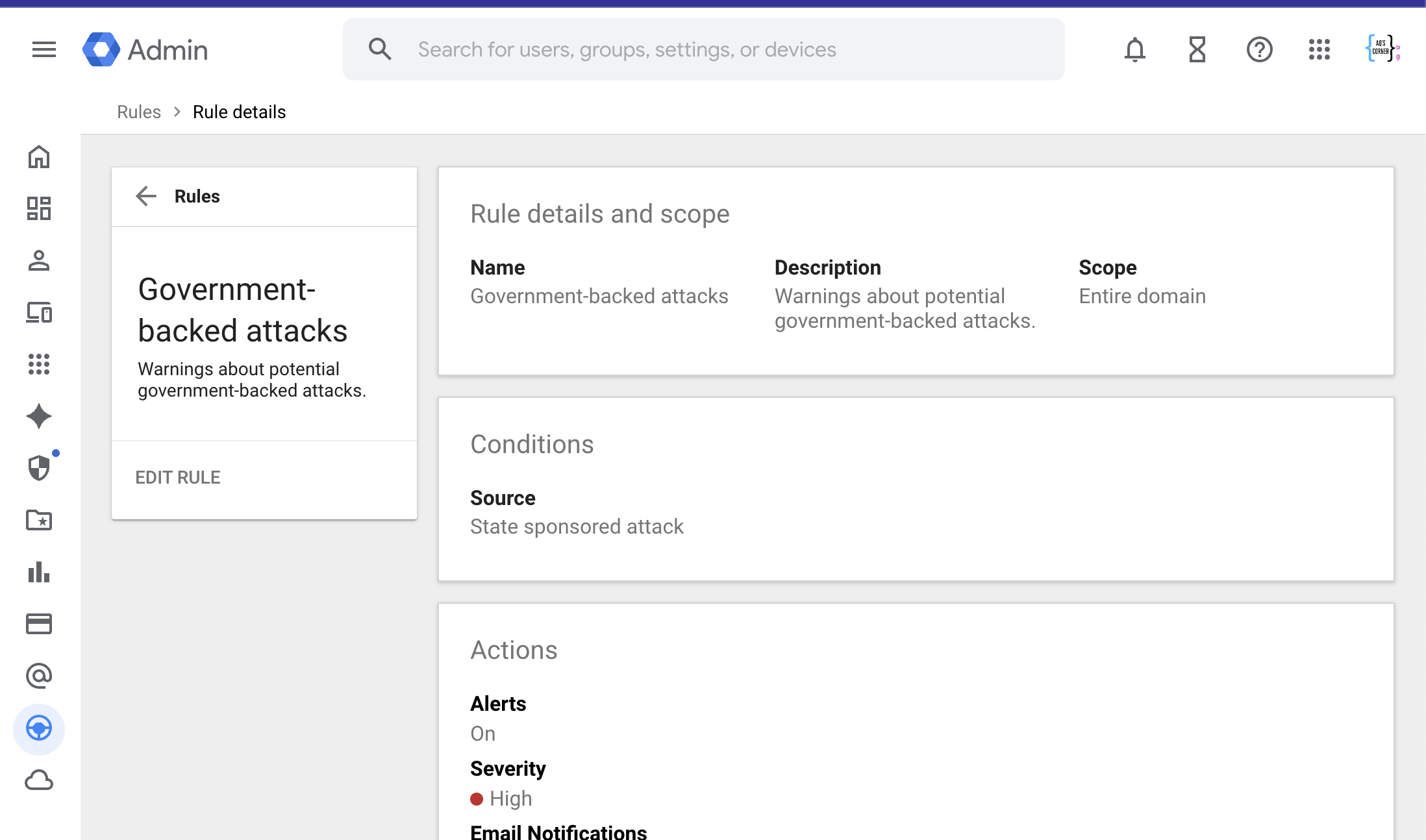
Screenshot: Google Workspace Admin Console showing the “Government-backed attacks” rule under Security → Rules.
⚔️ Why This Is a Power Move for Small Businesses
Having this feature turned on isn’t just a good security habit; it’s a leadership move.
It says:
“We may be a small business, but our security mindset is enterprise-level.” You’re showing that you care about:
- Protecting your customer data
- Catching suspicious activity early
- Building a brand clients can trust
Google Workspace gives you enterprise-grade protection, and this feature is one of the strongest shields in your toolkit.
Why I Use It for My Business Email
This feature is available through Google Workspace accounts, which are designed for business and professional use not standard personal Gmail. I have it turned on for my AQ’s Corner business email, where I manage client communications, digital materials, and company data under my own domain.
It’s worth noting that Google Workspace Individual does exist a paid plan for solo professionals who use a personal @gmail.com address. While that plan includes premium tools like appointment booking and professional email layouts, it’s different from the standard business editions that include admin controls and organization-wide security features (like this one).
In short: if you’re using Google Workspace for your business domain, this feature applies to you. If you’re using regular Gmail or a Workspace Individual plan, this particular security rule won’t appear.





 AQ'S Corner
Leave a comment