
Photo Credit: I give all the glory to the scammer who sent me the email
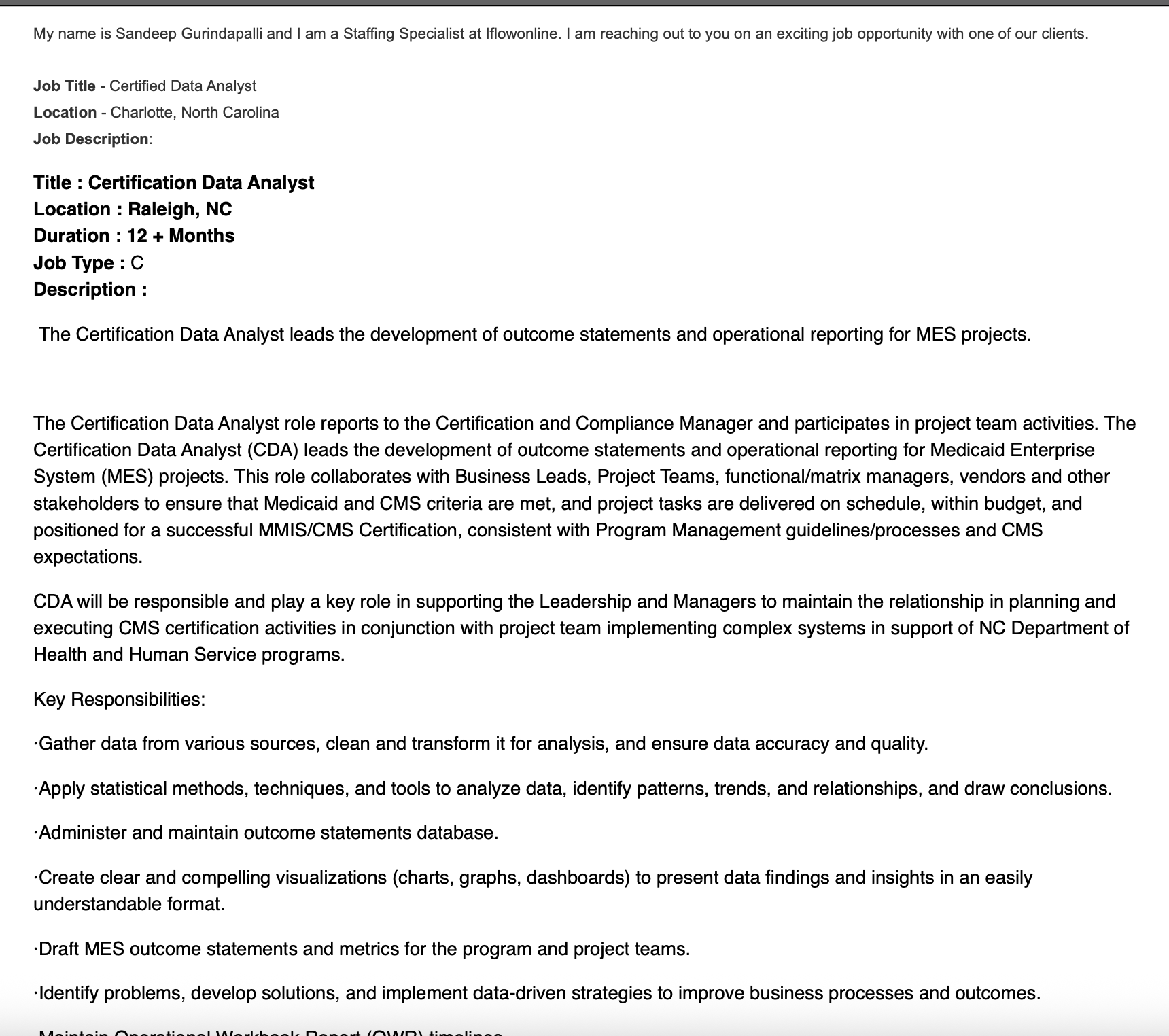
Today, I received what looked like an exciting opportunity in my inbox: a recruiter reaching out about a Certified Data Analyst position in North Carolina. The email came with a job description, a long list of responsibilities, and a request for my resume and availability.
But something about the message didn’t feel right. The domain name was unfamiliar. The company name wasn’t listed in the signature, just “N/A.” There was no phone number, no professional links, and no way to verify who this recruiter really was. Just an oddly formatted job post with a few too many buzzwords.
As a cybersecurity analyst, I’ve learned to trust my instincts and then back them up with facts. So I decided to do a little digging. Here’s how I used three free online tools: WHO.IS, VirusTotal, and ICANN Lookup to uncover major red flags and protect myself.
Whether you’re a job seeker, small business owner, or just someone who gets emails from strangers, this process could help you, too.
🛠️ Tool #1: WHO.IS — Domain Background Check
Purpose: WHO.IS lets you see the background of a domain, like who registered it, when it was created, and who owns it. If you’re unsure whether a domain is legit, this is often your first step.
What I Found:
I looked up iflowonline.com, the domain the recruiter used. WHO.IS returned… nothing. No registrar name, no creation date, no metadata at all.
🚩 Red Flag: A legitimate domain usually shows at least some basic data. Seeing absolutely zero information suggests:
- The domain may be expired or never registered properly
- Or it could be tied to scam tactics like disposable domains used for mass emails
📌 Note: WHO.IS Isn’t Always the Final Word
Because of modern privacy laws (like GDPR), some domain registrars now block WHO.IS data. So a blank WHO.IS result doesn’t always mean the domain is shady, but it does mean you need to dig deeper. That’s why I used ICANN Lookup next to confirm.
🛠️ Tool #2: ICANN Lookup — Registry Confirmation
Purpose: ICANN is the official Internet domain registry. Unlike WHO.IS, which pulls from public sources, ICANN taps into the domain’s central registration records.
What I Found:
ICANN Lookup also returned no results for iflowonline.com. That confirmed something was definitely off.
🚩 Red Flag: This suggests the domain is either inactive, unregistered, or has been removed from public access, all of which are suspicious if someone is using that domain to contact job seekers.
🛠️ Tool #3: VirusTotal — Threat Intelligence and Risk Check
Purpose: VirusTotal scans domains, URLs, and files across dozens of antivirus engines and threat intelligence databases to flag potential risks.
What I Found:
- The domain iflowonline.com was last scanned in 2018, over six years ago.
- It was flagged as “parked” by BitDefender, meaning it’s not in real use.
- The site is not secure (HTTP instead of HTTPS).
- No real content, no updates, and no valid certificates.
🚩 Red Flags:
- A parked domain is often a placeholder, not a live, active business.
- No HTTPS means the site doesn’t protect user data.
- No recent scans suggest it’s not actively maintained, a common trait of abandoned or reused scam domains
Recap: What Triggered My Investigation
Let’s break down what made me dig in and what I found:
| What I Noticed | Tool I Used | What It Revealed |
| Unfamiliar domain name | WHO.IS & ICANN | Domain appears unregistered or inactive |
| Recruiter used “N/A” instead of a company | Email header | Lack of professionalism |
| No phone number or LinkedIn | Manual check | No trace of real business |
| Odd unsubscribe link | VirusTotal | Unsafe domain, flagged as parked |
| No secure connection (HTTP) | VirusTotal | Lack of basic web security |
| Job post was vague and keyword-heavy | Context | Common tactic in phishing & scam attempts |
Why This Matters (and How You Can Protect Yourself)
We’re living in a time where cyber scams target job seekers, small businesses, and even kids. This wasn’t just about me protecting my inbox, this is the exact kind of real-world problem I help others defend against every day.
If you receive a suspicious email:
- Don’t click links or download files right away.
- Use tools like WHO.IS, ICANN Lookup, and VirusTotal to get the story behind the sender.
- Trust your instincts but verify them with tools.
How I Reported the Suspicious Email
After confirming the red flags, I didn’t just walk away, I reported it. If you receive a sketchy job offer or phishing email, here’s exactly where to report it:
Gmail/Email Provider – Click the three dots (⋮) in the top-right of the message and select “Report phishing.”
FTC – Go to reportfraud.ftc.gov to file a quick report.
FBI Internet Crime Center (IC3) – Report business or job scams at ic3.gov.
It only takes a few minutes and it helps protect others, too.
A Final Word from a Cybersecurity Analyst & Educator
This experience is one of the reasons why I founded AQ’s Corner LLC to help people stay informed, alert, and protected. I don’t just study threats. I investigate them in real time, using accessible tools and teaching others how to do the same.
Whether you’re a business leader, educator, or fellow job seeker, digital safety is now part of life. And I’m here to help make it simpler.
Let’s Connect
Based in North Carolina | Building safe tech solutions for families & small businesses
🌐 aqscorner.com
📚 Author of Emani and the CyberHero Response Team
🎙️ Host of CyberMom Plus One






 AQ'S Corner
Leave a comment