
Photo Credit: Generated with WordPress Generative AI
“Let me tell you a story. It’s got quiet mornings, digital dreams, and a URL so suspiciously extra, it came with lace trim, jazz hands, and a subtle threat of identity theft.” For a long time, we’re talking years, not weeks, I stayed away from most social media platforms. While everything else felt like noise, LinkedIn felt like a professional brunch where everyone wore blazers, spoke in bullet points, and clapped when you landed certifications. I could vibe with that. With minor spam every once (at least for me).
So why did I return to Facebook? Well, friends, I recently launched a children’s cybersecurity book and blog. I wanted to test the advertising waters, see how many folks I could reach, drive awareness to my brand, maybe sell a few books, and gain some new blog subscribers. You know, normal small business stuff, where I had hoped things would remain professional.
Cue the chaos. Literally, the minute I launched my new Facebook business page, I got what I can only describe as a very enthusiastic scam attempt. A suspicious message popped up talking about how I violated Facebook policy. It came with a link so fancy it deserved a runway. Now listen, I’m showing screenshots because I’m not about to type that scammy link out and accidentally become the reason someone loses their Facebook account. If you decide to type it out, that’s between you and your antivirus software. I wash my hands of it.
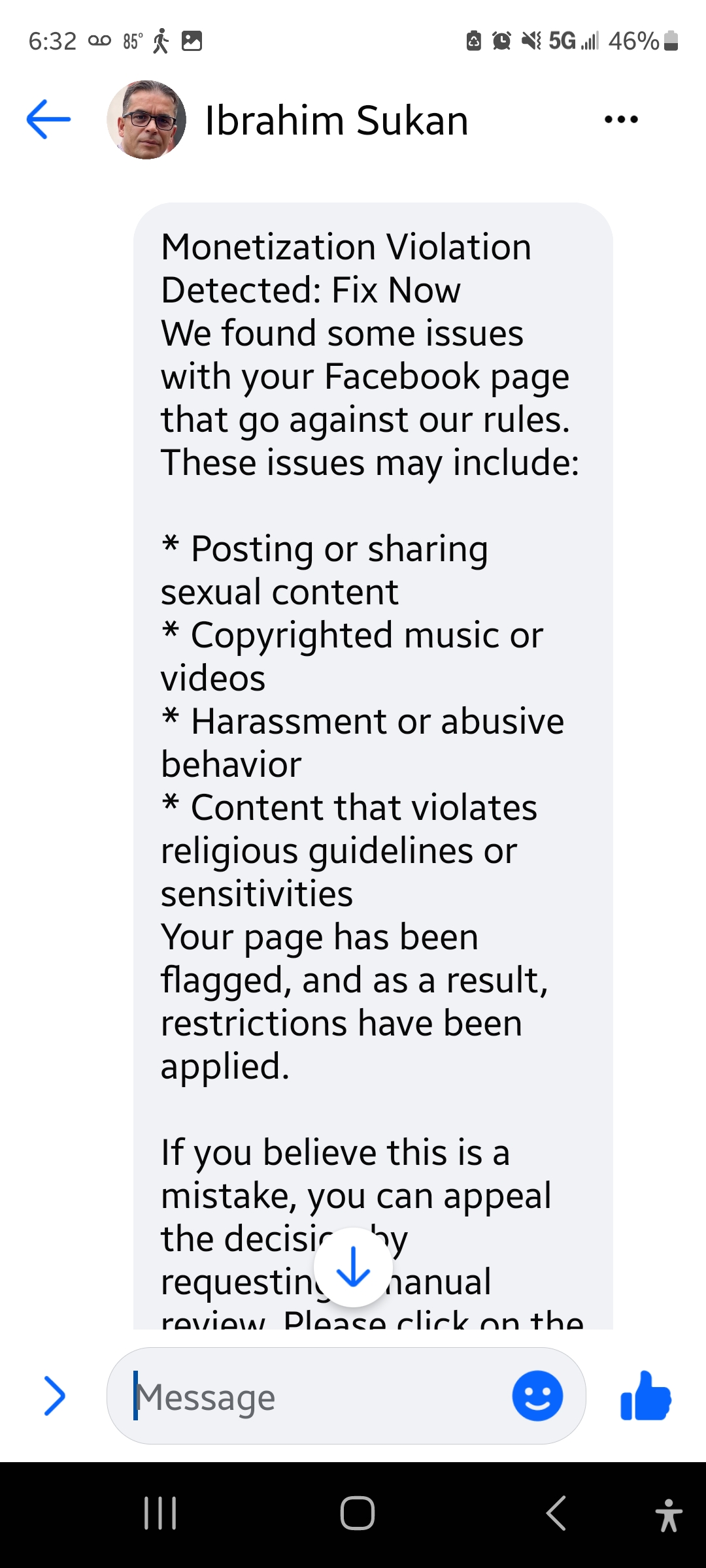
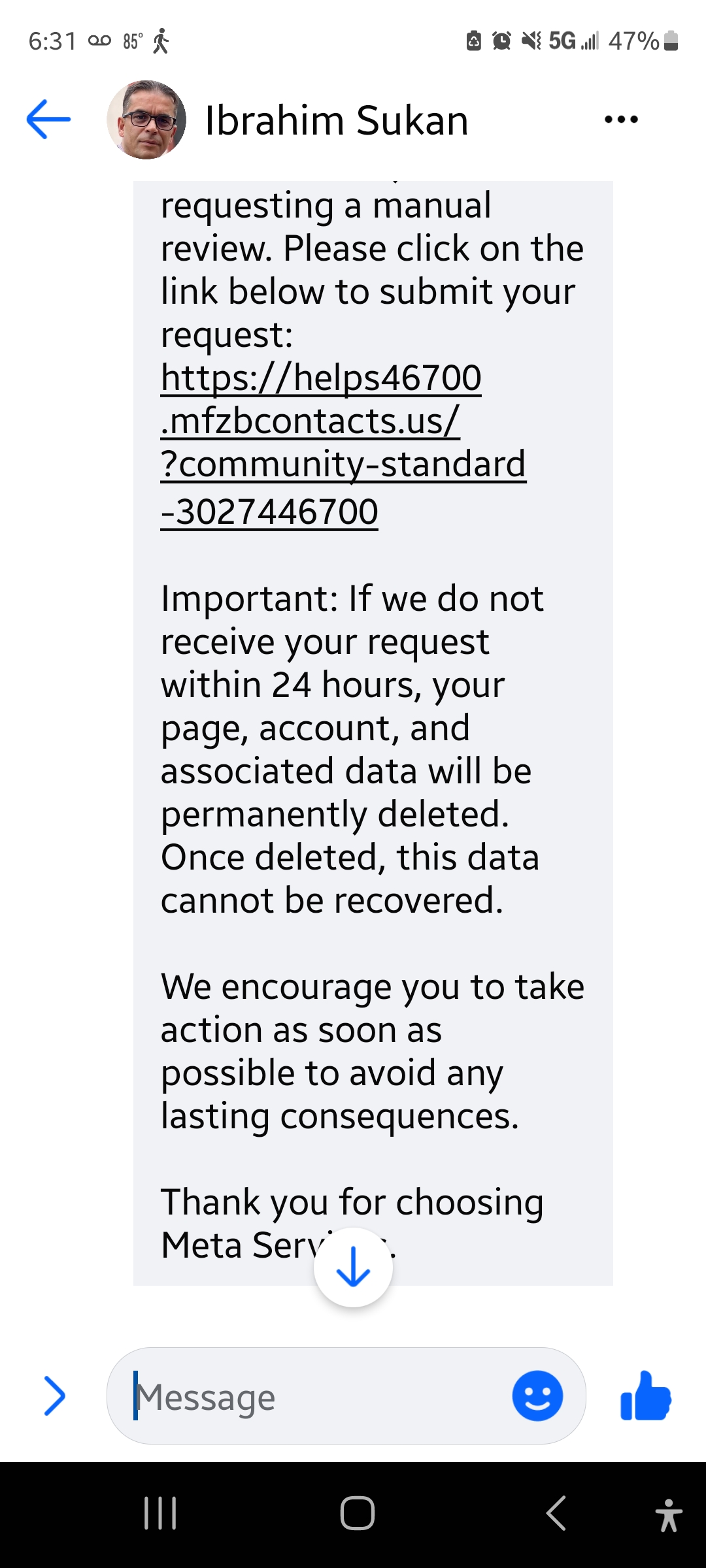
I got hit with four of these fake warnings, three of them back-to-back like they were in a relay race. I reported, blocked, deleted… and boom, here comes another one like, “Hey girl, heard you like scams.”
But let’s break it down: getting hit back-to-back like that? That’s textbook phishing urgency. It’s a classic social engineering move: flood you with messages, make it feel like your page is in danger, and rush you into clicking before your common sense has a chance to log in.
📌 Cyber Tip from the Sidelines: What’s “Phishing Urgency”?
Phishing urgency is when scammers try to create a false sense of panic or time pressure, like saying your account will be disabled in 24 hours if you don’t “verify” it. (like they did in the above screenshots) They want your adrenaline to spike and your logic to dip. Don’t fall for it. If something feels rushed, suspicious, or just off… slow down. Breathe. Research. Then delete it like last year’s bad haircut.
The Real Lesson: What to Know About Suspicious Links
Let’s talk real for a second. Bots and scam links are everywhere now, especially on platforms like Facebook. They’re often triggered the second you create a public-facing business page or post an ad. And if you don’t know what to look for, you could easily fall into their trap.
Here’s how you can spot a phishy Facebook fraud from a mile away:
Red Flags in a URL:
- Extra characters like dashes or numbers in the domain (e.g., faceb00k-alerts-policy.biz)
- Domains that end in .biz, .info, or anything you’ve never seen Meta use officially
- Phrases like “suspend,” “violation,” or “verify now” are thrown into the link
- No SSL certificate (always check for https:// and a lock icon)
How to Check a Suspicious Link:
I did a little research so you don’t have to, but also so you know how to if you’re curious.
I searched: “What does a legitimate Facebook violation URL look like?”
Here’s what came up:
Facebook’s actual help and security URLs will almost always look like this:
- https://www.facebook.com/help/
- https://www.facebook.com/security/
- https://business.facebook.com/ (for Meta Business support)
Anything outside of these? Suspect it.
Bonus tip: if you ever want to verify a link, use a tool like https://nordvpn.com/link-checker/ to see its reputation.
Let’s Talk About the Bots
Facebook’s bot problem has gotten worse. I’m not talking about the cute, automated chatbots that help with customer service. No, I’m talking about the shady bots pretending to be policy enforcers or message requesters who claim you’re violating community guidelines, just to get you to click a fake link.
What You Should Do:
- Don’t click links you didn’t ask for.
- Check URLs by Googling the structure of official platform links.
- Look at the sender’s profile; if it’s got no followers, a generic name, or uses AI-generated photos, don’t engage.
- Report and block. Meta needs all the help they can get managing the fake squad.
- Bookmark the real help pages now. Just in case you ever get a real message, you can compare it.
The Takeaway
My brief return to Facebook was like stepping into a digital mall where half the stores are real businesses, and the other half are sketchy pop-ups held together with duct tape, fake reviews, and dreams of stealing your login. One minute you’re trying to connect with your audience, and the next you’re dodging scam links dressed up like customer service reps. Social media is powerful, no doubt, but it’s also a funhouse mirror of reality, and if you’re not careful, you’ll end up buying a fake Gucci bag full of malware.
I’m still going to use Facebook, but now I’m walking in with a flashlight, a helmet, and two-factor authentication (as we should on any platform).
Stay smart out here, digital fam. And if a link looks too extra? It probably is.





 AQ'S Corner
Leave a comment